

Key Takeaways
- Enterprise MCP servers provide a controlled layer for connecting AI agents with approved business systems and data.
- Security and access controls should be built into the architecture from the beginning, including authentication, authorization, monitoring, and audit logging.
- MCP integrations can connect AI agents with CRM, ERP, databases, APIs, knowledge bases, and other enterprise platforms without exposing these systems directly.
- Development costs can range from $9,000 to $100,000+, depending on integrations, security requirements, infrastructure, and overall complexity.
- Ongoing governance and monitoring are essential for maintaining secure, scalable, and reliable AI agent integrations as enterprise adoption grows.
How to Build an Enterprise MCP Server for Secure AI Agent Integration
Enterprise AI agents increasingly need access to internal applications, databases, APIs, documents, and business tools to complete meaningful tasks. However, giving agents direct access to multiple enterprise systems can create challenges around security, permissions, integration, monitoring, and governance.
The Model Context Protocol (MCP) provides a standardized way for AI applications to connect with external tools and data sources. An enterprise MCP server can act as a controlled integration layer between AI agents and business systems, allowing organizations to expose specific capabilities without providing unrestricted access to their underlying infrastructure.
Building such a server requires more than implementing MCP endpoints. Enterprises need to design authentication, authorization, tool permissions, data protection, logging, monitoring, error handling, and deployment strategies around the server architecture.
This guide explains how to build an enterprise MCP server for secure AI agent integration, covering its architecture, core components, security controls, technology stack, implementation process, governance requirements, challenges, and best practices.
What Is an Enterprise MCP Server and How Does It Work?
An enterprise MCP server is a controlled software component that allows AI applications or agents to interact with approved enterprise tools, data sources, and services through the Model Context Protocol (MCP). Instead of building separate integrations for every AI application, organizations can use MCP-based interfaces to expose specific capabilities in a structured way.
For example, an enterprise MCP server could provide an AI agent with controlled access to a customer database, internal knowledge base, CRM system, project management platform, or business API. The server determines which tools and resources are available and can enforce authentication, authorization, validation, and monitoring requirements.
How MCP Fits Into an Enterprise Architecture
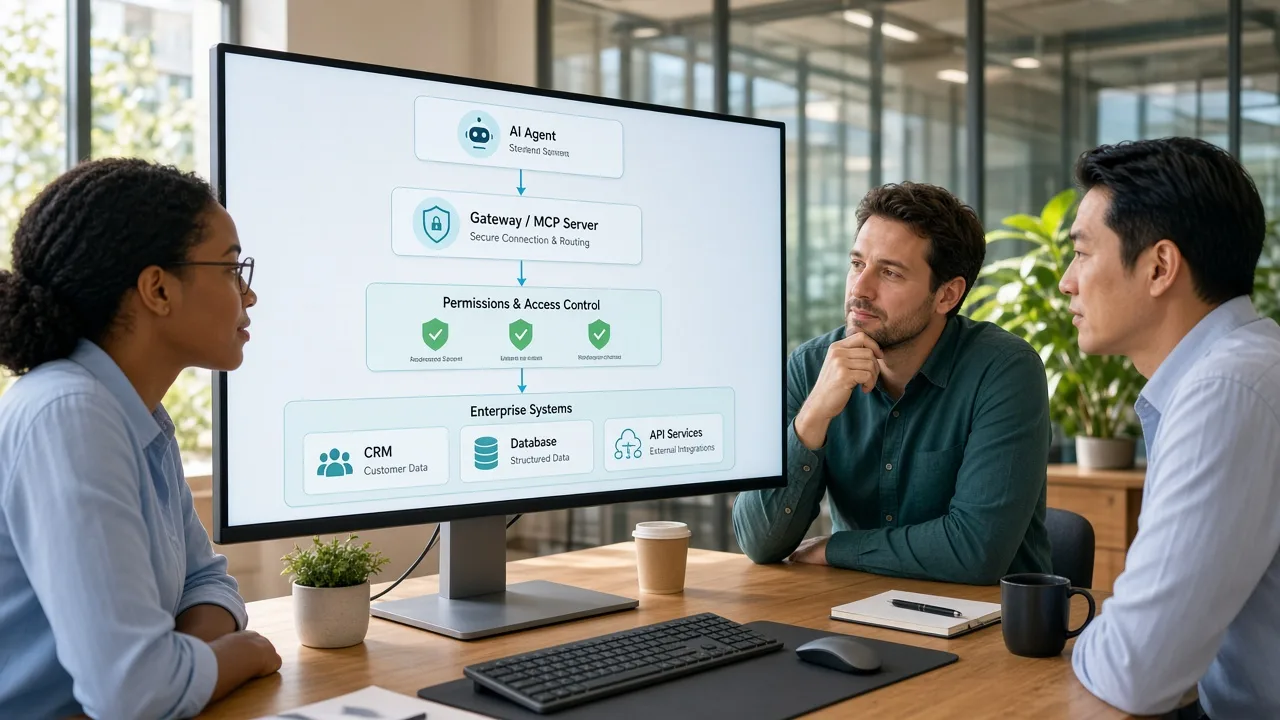
A typical architecture can be viewed as four layers:
AI Application or Agent → MCP Client → MCP Server → Enterprise Systems
The AI agent communicates with an MCP client, which connects to the appropriate MCP server. The server then handles requests for approved tools or resources and communicates with the underlying enterprise systems.
This separation creates a boundary between the AI layer and internal infrastructure. Instead of allowing an agent to directly interact with every database or application, organizations can expose only the specific functions required for a particular workflow.
What Can an MCP Server Expose?
An MCP server can provide capabilities such as:
- Tools for performing approved actions
- Resources for accessing relevant information
- Prompts for reusable interaction patterns
- Controlled connections to APIs, databases, files, and business applications
For enterprise deployments, these capabilities should be exposed according to defined business permissions and security policies. The MCP server therefore becomes an important part of the integration and governance architecture rather than simply another API endpoint.
Why Enterprises Need MCP for Scalable AI Agent Integration
Enterprise AI agents often need to work with multiple business systems at the same time. Without a standardized integration layer, organizations may end up creating separate connections between individual AI applications and each internal tool. This can increase development effort and make security and maintenance more difficult.
Standardizing AI-to-System Connections
MCP provides a consistent protocol for connecting AI applications with external tools and resources. This can reduce the need to design completely different integration patterns for every agent and enterprise system.
Controlling Access to Business Systems
An MCP server can expose only selected tools and resources instead of giving an AI agent unrestricted access to an underlying system. Organizations can define which actions are available and apply authentication and authorization controls around them.
Simplifying Enterprise Integration
Businesses commonly use CRM platforms, ERP systems, databases, internal APIs, document repositories, and SaaS applications. An MCP layer can provide controlled interfaces for these systems, making them easier for compatible AI applications to consume.
Supporting Multiple AI Agents
A centralized MCP architecture can support multiple AI agents that need access to the same approved business capabilities. Changes to an integration can potentially be managed at the server layer rather than rebuilding every agent connection independently.
Improving Monitoring and Governance
Enterprise MCP servers can provide a central point for logging requests, monitoring tool usage, tracking failures, and reviewing access patterns. These capabilities can support governance and security teams when investigating how AI systems interact with business resources.
Enabling Scalable AI Integration
As organizations move from individual AI experiments toward broader enterprise deployments, standardized integration becomes increasingly important. Teams offering AI integration services can use MCP-based architectures to create reusable connections between AI applications and approved enterprise capabilities.
Understanding the Core Architecture of a Secure MCP Server
A secure enterprise MCP server should be designed as a layered architecture rather than as a simple connection between an AI agent and an internal application. Each layer should have a clearly defined responsibility for communication, access control, data handling, monitoring, and security.
A typical architecture can be organized into the following layers:
AI Agent and MCP Client Layer
The AI agent acts as the business-facing intelligence layer, while the MCP client manages communication with the MCP server. The client sends requests for approved tools or resources and receives structured responses that the agent can use to complete a task. Keeping the client separate from the server prevents the agent from directly accessing enterprise databases, applications, or APIs.
MCP Server and Tool Layer
The MCP server works as the controlled gateway between AI applications and enterprise capabilities. It defines which tools, resources, or actions are available and applies the required validation before forwarding requests.
For example, an MCP server may expose tools for retrieving customer records, checking inventory, creating service tickets, or querying approved business data.
Enterprise Systems Layer
Behind the MCP server are the organization's existing systems, such as CRM platforms, ERP software, databases, document repositories, internal APIs, and cloud services. The server should interact with these systems through controlled interfaces instead of giving AI agents unrestricted access.
Identity and Authorization Layer
Authentication confirms who or what is making a request, while authorization determines which operations are permitted. Enterprise MCP implementations should connect these controls with existing identity and access-management policies so permissions can be enforced consistently.
Security and Policy Layer
This layer validates requests, enforces data-access rules, applies rate limits where necessary, and prevents unauthorized operations. Sensitive actions can also require additional approval or human confirmation before execution.
Monitoring and Audit Layer
Every important interaction should be observable through logs, metrics, alerts, and audit records. Organizations can use this layer to investigate failures, monitor unusual activity, track tool usage, and demonstrate compliance.
This layered approach also gives an AI agent development company a clear structure for separating agent behavior from enterprise security and integration logic.
Understanding the Essential Components of an Enterprise MCP Server
Building an enterprise MCP server requires more than setting up a protocol connection. The server needs several components that work together to manage AI requests, expose approved capabilities, protect enterprise data, and maintain visibility across every interaction.
MCP Hosts and Clients
The host is the AI application or agent environment that initiates interactions with enterprise capabilities. MCP clients within the host maintain communication with MCP servers and request access to approved tools or resources.
MCP Server Layer
The MCP server contains the business capabilities that AI agents are allowed to access. It can expose specific tools for actions, resources for retrieving information, and other supported capabilities.
Enterprise Data Sources
MCP servers typically connect with existing enterprise resources such as databases, CRM and ERP platforms, internal APIs, cloud storage, knowledge bases, and document management systems.
Authentication and Authorization
Identity controls determine which users, agents, applications, and services can connect to the MCP environment. Authorization policies then determine which tools or resources each identity can access.
Monitoring and Audit Layer
Monitoring provides visibility into requests, tool execution, failures, response times, and unusual activity. Audit records can capture important events such as authentication attempts, sensitive data access, and high-impact actions.
Policy and Validation Controls
A policy layer can validate incoming requests before they reach enterprise systems. It can enforce input validation, data-access restrictions, rate limits, approval requirements, and other organizational rules.
Essential Security Controls for Securing Enterprise MCP Servers
Security should be treated as a core architectural requirement when building an enterprise MCP server, especially when AI agents can access confidential business information or trigger operational actions. The server should apply multiple controls so that a compromised agent, unauthorized user, or malformed request cannot easily reach sensitive systems.
Strong Authentication
Every connection should be associated with a verified identity. Organizations can integrate the MCP environment with established identity providers and authentication mechanisms rather than creating isolated credentials for every AI application.
Fine-Grained Authorization
Authentication alone does not determine what an AI agent should be allowed to do. Authorization policies should define which tools, resources, data categories, and operations are available to each identity.
For example, an agent may be permitted to retrieve customer information but not modify account records or initiate financial transactions.
Input Validation and Tool Restrictions
AI-generated requests should be validated before they reach internal systems. MCP tools should define expected parameters, data types, and permitted operations. Restricting tools to clearly defined business functions can reduce the possibility of unintended or unauthorized actions.
Data Protection
Sensitive information should be protected during transmission and while stored in supporting systems. Organizations should also determine which data can be returned to AI agents and whether personally identifiable, financial, or confidential information needs masking or additional controls.
Rate Limiting and Abuse Prevention
Rate limits can prevent excessive requests from overwhelming enterprise systems or generating unnecessary costs. Additional controls can detect repeated failed requests, unusual tool usage, or unexpected request patterns and trigger alerts when necessary.
Audit Logging and Continuous Monitoring
Security-relevant events should be recorded in centralized logs. Organizations can monitor authentication events, tool calls, data-access activity, failed requests, and administrative changes. Continuous monitoring makes it easier to investigate incidents and identify abnormal behavior.
Human Approval for High-Risk Actions
Not every AI-generated action should execute automatically. Operations such as deleting records, approving payments, changing critical configurations, or sending sensitive communications may require human confirmation. This creates an additional safeguard for high-impact workflows.
How to Build an Enterprise MCP Server for Secure AI Integration
Developing an enterprise MCP server requires a structured implementation approach because the server will sit between AI agents and business-critical systems. A well-defined software development process helps teams establish security requirements, integration boundaries, testing procedures, and deployment responsibilities before production use.
1. Define Business Use Cases and Requirements
Start by identifying what AI agents need to accomplish. Common use cases include retrieving customer information, searching internal knowledge bases, creating support tickets, accessing inventory data, or triggering approved workflows.
2. Identify Systems and Data Sources
Map the enterprise applications that the MCP server needs to connect with. These may include CRM, ERP, databases, cloud services, internal APIs, and document repositories. Classify the information handled by each system and determine which resources should be available to AI agents.
3. Design the MCP Architecture
Define how AI agents, MCP clients, the server, authentication services, enterprise systems, and monitoring infrastructure will communicate. Establish clear boundaries between agent logic and backend systems so that AI applications cannot bypass security controls.
4. Define Tools and Resources
Determine which enterprise capabilities should be exposed through the MCP server. Each tool should have a specific purpose, well-defined inputs and outputs, validation rules, and appropriate permissions.
5. Implement Authentication and Authorization
Connect the MCP server with the organization's identity infrastructure and establish permission policies. Access should be based on the identity, role, application, and sensitivity of the requested operation where applicable.
6. Build Enterprise Integrations
Develop connectors or service integrations for the required databases, APIs, business applications, and knowledge repositories. The integration layer should handle errors, timeouts, data validation, and appropriate response formatting.
7. Add Security and Monitoring Controls
Implement request validation, access policies, logging, monitoring, rate limiting, and safeguards for high-risk actions. Security events and important tool executions should be traceable through centralized audit records.
8. Test and Deploy in Controlled Stages
Test individual tools, integrations, permissions, failure scenarios, and end-to-end agent workflows before production deployment. Start with a limited environment or selected use cases, evaluate performance and security behavior, and expand access gradually.
Technology Stack for Secure and Scalable Enterprise MCP Server Development
The technology stack for an enterprise MCP server should support secure communication, scalable integrations, reliable data processing, and centralized monitoring. The exact choices depend on the organization's existing infrastructure, programming expertise, security requirements, and connected enterprise systems.
| Technology Layer | Recommended Technologies | Purpose |
|---|---|---|
| Programming Languages | TypeScript, Python, Java, Go | Build MCP servers, business logic, integrations, and supporting services |
| MCP Framework / SDK | Official MCP SDKs for TypeScript, Python, Java, or Go | Implement MCP-compatible servers, tools, resources, and communication |
| Backend Frameworks | Node.js, FastAPI, Spring Boot, Gin | Develop APIs, business logic, authentication flows, and enterprise integrations |
| API & Integration Layer | REST APIs, GraphQL, API gateways | Connect the MCP server with enterprise applications and third-party services |
| Databases | PostgreSQL, MySQL, MongoDB, Redis | Store application data, configuration, session information, and cached results |
| Authentication & Authorization | OAuth 2.0, OpenID Connect, JWT, enterprise IAM | Manage identities, authentication, permissions, and access policies |
| Cloud & Infrastructure | AWS, Microsoft Azure, Google Cloud, Kubernetes | Deploy, scale, isolate, and manage MCP server infrastructure |
| Containerization | Docker, Kubernetes | Package services consistently and support scalable deployments |
| Security | TLS, secrets management, WAF, network policies | Protect communications, credentials, APIs, and infrastructure |
| Monitoring & Logging | OpenTelemetry, Prometheus, Grafana, ELK Stack | Monitor requests, performance, errors, system health, and security events |
| CI/CD | GitHub Actions, GitLab CI/CD, Jenkins | Automate testing, security checks, builds, and deployments |
| Testing | Postman, Pytest, Jest, JUnit | Test APIs, tools, authentication, integrations, and application behavior |
The selected software development technologies should also align with the organization's existing systems rather than introducing unnecessary infrastructure. For example, an enterprise already using Java and Kubernetes may benefit from keeping the MCP implementation within that ecosystem, while a team with strong Python expertise may choose Python-based backend services and MCP tooling.
Connecting MCP Servers With Enterprise Systems for Seamless AI Integration
An enterprise MCP server becomes useful when it can securely interact with the organization's existing applications, databases, APIs, and knowledge systems. Instead of replacing these systems, MCP provides a controlled layer through which AI agents can access specific capabilities.
CRM and Customer Platforms
An MCP server can expose approved customer-service functions from CRM platforms, allowing AI agents to retrieve customer information, summarize account activity, or create support requests. Access should be limited to the data and actions required for each specific workflow.
ERP and Business Applications
Enterprise resource planning systems can provide information about inventory, orders, suppliers, finance, and other operational processes. MCP tools can expose selected ERP functions without giving an AI agent unrestricted access to the underlying application.
Databases and Internal APIs
MCP servers can connect with relational databases, data services, and internal APIs to retrieve approved business information. Database access should generally be mediated through controlled queries, predefined services, or business logic rather than allowing unrestricted AI-generated database operations.
Knowledge Bases and Document Repositories
Organizations can connect MCP servers with internal knowledge bases, document management platforms, and approved content repositories. This allows AI agents to retrieve relevant organizational information while access policies determine which documents or data sources can be searched.
Cloud and Third-Party Services
MCP integrations can also connect approved cloud services and external APIs. API credentials should remain protected on the server side, with agents receiving only the information or functionality exposed through authorized MCP tools.
Building an Integration Strategy
Before connecting a system, organizations should evaluate its data sensitivity, authentication method, API limitations, required permissions, and failure-handling requirements. An enterprise software development company can help design these integrations around existing enterprise architecture while maintaining consistent security and governance controls.
MCP Server Governance and Access Management for Enterprise Security
As enterprises connect more AI agents and business systems through MCP, governance becomes essential for maintaining control over tools, data, identities, and permissions. A governance framework should define how MCP servers are approved, configured, monitored, updated, and retired.
Establish Clear Ownership
Each MCP server should have a designated technical and business owner. Ownership clarifies who is responsible for approving new tools, reviewing access permissions, handling security issues, and maintaining integrations.
Apply Least-Privilege Access
Agents and users should receive only the permissions required for their specific tasks. A customer-support agent, for example, may need access to customer records and ticketing tools but not financial systems or administrative configuration tools.
Maintain an MCP Tool Registry
Organizations can maintain a central inventory of MCP servers, tools, resources, owners, connected systems, and permission requirements. This makes it easier to understand what capabilities are available and identify outdated or unnecessary integrations.
Review Access Regularly
Permissions should be reviewed periodically and whenever an employee, application, agent, or business workflow changes. Unused credentials and obsolete tool permissions should be removed to reduce unnecessary access.
Define Approval Policies
High-impact tools should have stricter approval requirements than read-only capabilities. Organizations can require security or business-owner approval before tools capable of modifying sensitive records, executing transactions, or changing configurations are made available.
Monitor Governance and Compliance
Access events, administrative changes, tool usage, and security exceptions should be logged and reviewed. Organizations operating under industry-specific regulations should also align MCP governance with their existing compliance and data-management requirements.
Organizations may also use IT consulting services when developing an enterprise-wide governance framework, particularly when MCP needs to operate across multiple departments, cloud environments, applications, and security policies.
Key Challenges Businesses Face During Enterprise MCP Implementation
Enterprise MCP adoption can simplify AI-to-system integration, but organizations may encounter technical, security, and operational challenges during implementation. The following table summarizes the key challenges and practical ways to address them.
| Common Challenge | What It Means | How to Address It |
|---|---|---|
| Complex Legacy Integrations | Older enterprise applications may have limited APIs, outdated architectures, or inconsistent data structures. | Use integration layers, custom connectors, or existing middleware to create controlled connections. |
| Excessive Tool Access | Exposing too many tools can increase security risks and make it difficult to control agent behavior. | Apply least-privilege access and expose only the tools required for specific workflows. |
| Data Security and Privacy | MCP servers may process sensitive customer, financial, operational, or employee information. | Use strong authentication, authorization, encryption, data filtering, and continuous monitoring. |
| Inconsistent Enterprise Data | Duplicate, incomplete, or outdated information can affect the reliability of AI-generated responses and actions. | Establish data-quality controls and clearly identify authoritative sources for important information. |
| Performance and Scalability | Increasing numbers of AI agents and tool requests can place additional load on the MCP server and connected systems. | Use scalable infrastructure, caching, load balancing, rate limiting, and performance monitoring. |
| Monitoring AI-Driven Actions | Traditional application monitoring may not provide sufficient context about AI-generated requests. | Track agent identity, tool usage, accessed systems, request outcomes, and relevant security events. |
| Governance Across Teams | Multiple departments may create MCP servers independently, resulting in inconsistent security and ownership. | Establish centralized governance standards, approval procedures, ownership policies, and tool inventories. |
Enterprise MCP Server Development Cost and Key Pricing Factors
The cost to build an enterprise MCP server can range from $9,000 to $100,000+, depending on the number of integrations, security requirements, AI agent workflows, infrastructure, and governance capabilities involved. A basic implementation with a limited number of tools will require less development effort, while a large enterprise deployment connecting multiple systems can require significantly more engineering and testing.
| MCP Server Type | Estimated Cost | Development Timeline |
|---|---|---|
| Basic MCP Server | $9,000–$20,000 | 2–3 months |
| Mid-Level Enterprise MCP Server | $20,000–$45,000 | 3–5 months |
| Advanced MCP Integration Platform | $45,000–$70,000 | 5–7 months |
| Large-Scale Enterprise MCP Server | $70,000–$100,000+ | 7–10+ months |
Best Practices for Secure AI Agent Integration in Enterprise Systems
Building an MCP server is only the first step. Enterprises also need consistent practices for managing security, integrations, access, and ongoing operations after deployment. The following practices can help organizations maintain a controlled AI integration environment.
Start With Limited Use Cases
Begin with clearly defined workflows instead of connecting every enterprise system at once. A limited rollout makes it easier to validate security controls, evaluate agent behavior, and identify integration issues before expanding MCP access.
Follow the Principle of Least Privilege
Give each AI agent access only to the tools and resources required for its assigned tasks. Read-only access should be preferred where write permissions are unnecessary, while high-impact actions can require additional approval.
Keep Enterprise Systems Behind Controlled Interfaces
AI agents should not receive unrestricted access to databases, internal applications, or infrastructure. Use the MCP server and approved integration layers to control which capabilities are exposed and how requests are processed.
Protect Credentials and Sensitive Data
API keys, access tokens, database credentials, and other secrets should be stored using secure secrets-management systems. Sensitive information returned to agents should also be filtered according to organizational data-access policies.
Monitor Every Important Interaction
Maintain visibility into authentication events, tool calls, failures, sensitive data access, and administrative changes. Monitoring and audit records can help teams detect unusual behavior and investigate incidents.
Test Before Expanding Access
Every new MCP tool or integration should undergo functional, security, and integration testing before production use. Changes to permissions or connected systems should also be validated rather than assuming previously approved configurations remain safe.
Establish Clear Governance
Define ownership for MCP servers and tools, establish approval procedures, review permissions regularly, and maintain an inventory of connected systems. Governance becomes increasingly important as multiple teams begin developing AI agents.
Conclusion
Building an enterprise MCP server provides organizations with a structured way to connect AI agents with internal applications, data, and business capabilities. Instead of giving agents direct access to enterprise systems, MCP can provide a controlled layer where organizations can manage tools, permissions, security policies, and monitoring.
A successful implementation requires more than protocol integration. Enterprises need a well-planned architecture, secure authentication and authorization, carefully defined tools, reliable system integrations, comprehensive testing, and ongoing governance. The development cost can range from $9,000 to $100,000+, depending on the number of integrations, security requirements, infrastructure, and complexity of the deployment.
As enterprises expand their use of AI agents, a properly governed MCP environment can help create more controlled and maintainable connections between intelligent applications and existing business systems.
Frequently Asked Questions
What is an enterprise MCP server?
An enterprise MCP server is a controlled layer that allows AI agents to securely access approved business tools, data, and applications.
How much does it cost to build an enterprise MCP server?
The cost can range from $9,000 to $100,000+, depending on integrations, security, infrastructure, and complexity.
How long does it take to build an MCP server?
A basic server may take 2–3 months, while complex enterprise implementations can take 7–10+ months.
What systems can an MCP server connect with?
It can connect with databases, CRM and ERP platforms, internal APIs, cloud services, knowledge bases, and document repositories.
Is an MCP server secure for enterprise use?
It can be secure when implemented with strong authentication, authorization, encryption, monitoring, and access controls.
Can multiple AI agents use the same MCP server?
Yes. Multiple AI agents can use shared MCP capabilities when appropriate permissions and access boundaries are configured.
Does MCP replace enterprise APIs?
No. MCP can provide a structured layer for AI access while existing APIs continue to handle communication with enterprise systems.
Why is monitoring important for MCP servers?
Monitoring helps organizations track tool usage, failures, access events, performance, and potentially unusual activity.