
Key Takeaways
- Permission enforcement belongs in code, not prompts. Relying on model instructions for access control is unreliable; filtering must happen structurally before retrieval.
- Every document needs permission metadata at ingestion. Retroactively tagging sensitivity and access rules after data is already indexed creates security gaps.
- Identity integration keeps permissions accurate over time. Syncing with existing identity providers prevents stale access from lingering inside the RAG system.
- Security investment upfront prevents bigger losses later. Skipping encryption, audit logging, or access control to save cost is a false economy.
- Scalability planning matters before data volume grows. Vector database and infrastructure choices made early determine how painful future scaling will be.
How to Build a Private Enterprise RAG System With Secure Data Access?
An enterprise asks an AI assistant a simple question about a client contract, and the model confidently answers using a document a different department was never meant to see.
That single failure explains why consumer-grade RAG tutorials don't work for enterprise use.
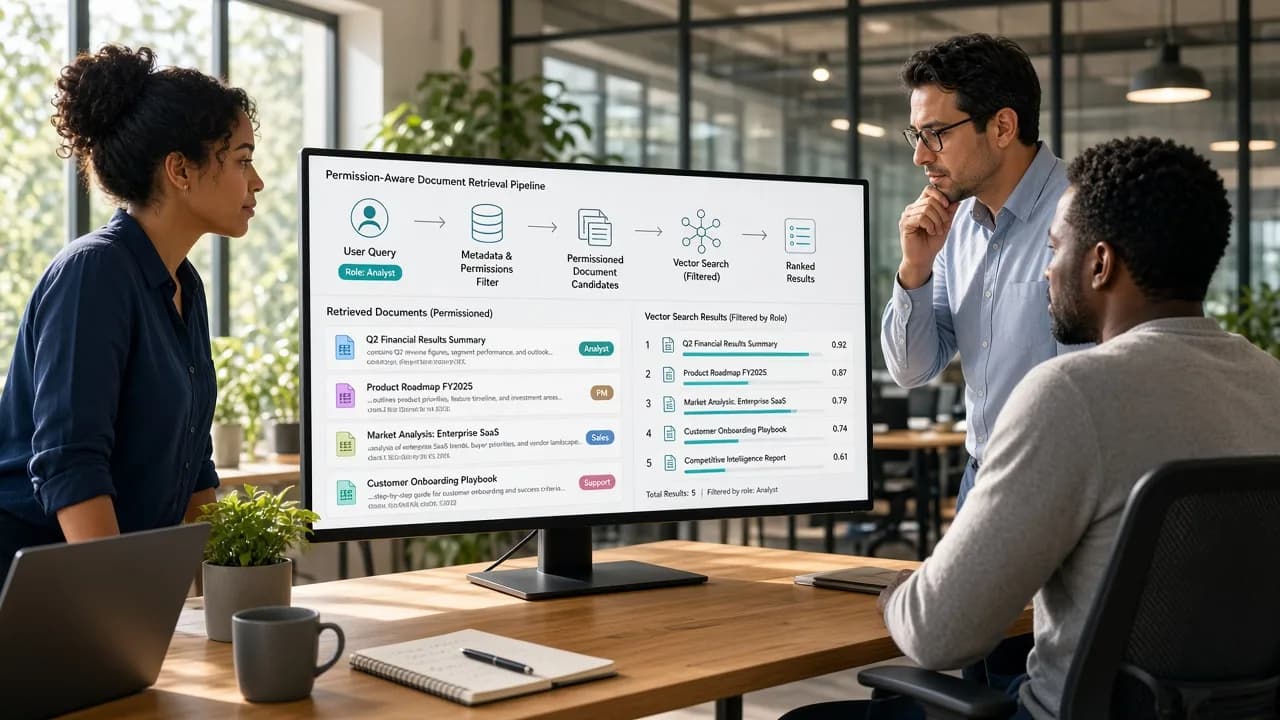
A private enterprise RAG system isn't just a model connected to a document store; it's a permission-aware retrieval pipeline built around who is allowed to see what, not just what's technically searchable.
Getting this right means treating access control as a first-class part of the architecture, not an afterthought bolted on after retrieval already happened.
This guide breaks down how to build a private enterprise RAG system with secure data access, from ingestion and permission filtering through retrieval, generation, and deployment.
What Is a Private Enterprise RAG System and How Does It Work?
A private enterprise RAG system retrieves answers from an organization's own documents, records, and internal knowledge, rather than relying solely on a model's general training data.
Unlike consumer RAG tools, every retrieval step respects who's actually allowed to see what.
1. Approved Data Gets Ingested and Prepared
The system starts by collecting documents, records, and knowledge sources the organization has approved for AI use, such as contracts, wikis, support tickets, or internal reports.
Each document carries metadata about its source, sensitivity level, and which teams or roles are permitted to access it.
2. Content Gets Chunked and Converted Into Embeddings
Documents get split into smaller, meaningful chunks, then converted into embeddings, numerical representations capturing semantic meaning.
These embeddings get stored in a vector database alongside their original permission metadata, so every retrievable chunk stays linked to who's actually allowed to see it.
3. A Query Triggers Permission-Filtered Retrieval
When a user asks a question, the system searches for the most relevant chunks based on semantic similarity, then filters results against that specific user's permissions before anything reaches the model.
This step is what separates enterprise RAG from consumer implementations that skip access control entirely.
4. The Model Generates an Answer From Approved Context Only
The model receives only the permission-filtered, relevant context and generates an answer grounded in that retrieved information, often with citations back to source documents.
If no authorized content answers the question, the system should say so, rather than falling back on ungrounded guesses.
Key Components of a Secure Enterprise RAG Architecture
Security in enterprise RAG isn't one feature; it's built across six distinct components working together.
Understanding each layer helps technical teams evaluate whether their architecture, or a vendor's AI development services, actually enforces security rather than just claiming to.
1. Ingestion and Data Classification Layer
Every document entering the system gets tagged with source, sensitivity level, and access permissions at ingestion time, not retroactively.
This layer also filters out content that shouldn't be indexed at all, like documents containing regulated data the organization has decided to exclude from AI retrieval entirely.
2. Permission-Aware Vector Store
The vector database stores embeddings alongside metadata linking each chunk to specific users, roles, or departments authorized to access it.
This isn't a bolt-on filter applied after search. Permissions live as structured data the retrieval query itself uses to exclude unauthorized content upfront.
3. Identity and Access Management Integration
The RAG system connects to the organization's existing identity provider, Okta, Azure AD, or similar, so user permissions stay synchronized automatically.
When someone's role changes or access gets revoked, that change propagates to what the RAG system will retrieve for them immediately.
4. Retrieval and Permission-Filtering Engine
This engine executes the actual search, applying permission filters before ranking results, not after.
Enforcing access control at the application layer, rather than trusting the model to follow prompt instructions, prevents permission leaks from becoming a prompt-engineering problem.
5. Model Gateway and Secure Inference Layer
Requests to the underlying model route through a backend gateway rather than connecting directly from any client application.
This layer enforces rate limits, logs every request for audit purposes, and ensures API keys or model credentials never get exposed to end users.
6. Audit Logging and Monitoring Layer
Every query, retrieved document, and generated response gets logged for audit purposes, creating a traceable record of what data influenced which answer.
This layer matters most during compliance reviews or security incidents, when teams need to reconstruct exactly what happened and why.
How to Build a Private Enterprise RAG System: Step-by-Step Process
Building enterprise RAG follows a specific sequence, one where permissions and data governance get designed before retrieval logic gets built.
Treating this like a standard software development process, without security baked in from step one, is how permission leaks happen later.
1. Define the Use Case and Data Boundaries
Start by identifying exactly which knowledge sources the system needs to draw from, and just as importantly, which ones it explicitly shouldn't.
Defining data boundaries upfront prevents scope creep later, when someone assumes a sensitive document was included simply because it existed somewhere in storage.
2. Classify and Tag Source Data by Sensitivity
Every document, record, or knowledge source gets reviewed and tagged with a sensitivity level and the specific roles or departments authorized to access it.
This classification step is foundational, since every downstream permission check depends entirely on this metadata being accurate from the start.
3. Build the Ingestion and Chunking Pipeline
Documents get cleaned, normalized, and split into meaningful chunks sized appropriately for retrieval, while permission metadata carries through the entire process.
Getting chunk size right matters here: too large loses precision, too small loses the surrounding context a chunk needs to make sense.
4. Generate Embeddings and Populate the Vector Store
Each chunk gets converted into an embedding and stored in a vector database alongside its permission metadata, source reference, and other structured fields.
This is what allows the system to search by meaning later, while still filtering results based on who's actually asking the question.
5. Implement Permission-Filtered Retrieval Logic
Build the retrieval logic so permission filtering happens before ranking, not after.
A query should never return results the user isn't authorized to see, even temporarily, since retrieval order and filtering sequence genuinely matter for both security and system performance at scale.
6. Connect Identity and Access Management
Integrate the system with existing identity infrastructure so user roles and permissions stay synchronized automatically, rather than maintained separately inside the RAG system itself.
This prevents the common failure mode where someone's access gets revoked company-wide but still works inside the AI tool.
7. Build the Model Gateway and Secure Inference Layer
Route all model requests through a backend gateway that enforces authentication, rate limits, and logging, keeping model credentials away from any client-facing application entirely.
This layer also becomes the natural place to implement model routing between different providers or model sizes later.
8. Integrate SSO and Enterprise Authentication
SSO and identity integration services ensure users authenticate once through the organization's existing login system, with that identity flowing directly into every permission check downstream.
This removes the risk of a separate, poorly maintained authentication system becoming the weakest link in the architecture.
9. Test Permission Enforcement Under Real Scenarios
Testing here goes beyond standard QA; it means deliberately attempting to retrieve unauthorized content using different user roles and edge cases.
Many teams run dedicated security testing specifically simulating a user trying to access data outside their permissions, before the system goes anywhere near production.
10. Deploy With Monitoring, Auditing, and Iteration
After launch, the team monitors retrieval accuracy, permission enforcement, and query logs closely, since real usage surfaces edge cases no test environment fully anticipates.
Regular audits of what data influenced which answers keep the system accountable as both data and permissions evolve.
Technology Stack for Private Enterprise RAG Development
Choosing the right software development technologies for enterprise RAG means prioritizing security and auditability as much as performance.
Here's what a production-grade private RAG system typically needs across ingestion, retrieval, generation, and infrastructure layers.
1. Backend Framework and API Layer
Python is the most common choice here, given its strong ecosystem for AI and data processing, though Node.js or Java work well too.
This layer exposes APIs for ingestion, retrieval, and generation, while enforcing authentication and permission checks before any request reaches the model.
2. Vector Database for Semantic Search
Purpose-built vector databases like Pinecone, Weaviate, or Milvus, or PostgreSQL with a vector extension, store embeddings alongside permission metadata.
The choice often depends on whether the organization prefers a managed cloud service or needs full control over data residency and storage location.
3. Embedding Models
Embedding models convert text into searchable vector representations, with options ranging from open-source models run locally to hosted APIs from major providers.
Enterprises handling sensitive data often prefer self-hosted embedding models specifically to avoid sending raw document content to a third-party service.
4. LLM Orchestration Framework
Frameworks like LangChain or LlamaIndex handle the coordination between retrieval, prompt construction, and model calls, reducing custom code needed to wire these pieces together.
Many enterprise teams build a thinner custom orchestration layer instead, prioritizing tighter control over permission enforcement at each step.
5. Model Gateway and Provider Abstraction
A model gateway sits between the application and one or more LLM providers, whether cloud APIs or self-hosted open-source models.
This abstraction layer lets the organization switch providers, apply routing logic, and enforce rate limits and logging without changing application code downstream.
6. Identity and Access Management
Integration with existing identity providers, Okta, Azure AD, or similar, ensures the RAG system inherits the organization's existing permission structure rather than maintaining a separate one.
This connection is what keeps retrieval permissions synchronized automatically as roles and access levels change over time.
7. Infrastructure and Deployment Environment
Cloud (AWS, Azure, GCP), on-premises, or hybrid deployment options each carry different trade-offs for data residency, cost, and control.
Regulated industries or highly sensitive data often push toward on-premise or private cloud deployment, even at the cost of some operational convenience.
8. Observability and Audit Logging Tools
Tools like OpenTelemetry, combined with dedicated logging infrastructure, track every query, retrieved document, and generated response for audit purposes.
This observability layer becomes essential during compliance reviews, letting teams reconstruct exactly what data influenced any specific answer the system generated.
Implementing Secure Data Access and Permission Controls in RAG
Permission enforcement is where most RAG implementations actually fail, not in retrieval accuracy.
Any LLM application development company building enterprise systems needs to treat access control as core architecture, not a filter applied as an afterthought once retrieval already works.
1. Enforce Permissions at the Retrieval Layer, Not the Prompt
Instructing a model through a prompt to "only use authorized data" isn't real security; models can be manipulated or simply make mistakes.
Permission filtering needs to happen in application code before results reach the model, excluding unauthorized content structurally rather than relying on instructions.
2. Tag Every Document With Structured Permission Metadata
Each ingested document needs explicit metadata defining which users, roles, or departments can access it, stored as structured data the retrieval query can filter against directly.
Vague or missing permission tags at ingestion time become permission leaks discovered later, usually the hard way.
3. Implement Row-Level and Attribute-Based Access Control
Rather than binary access rules, attribute-based access control lets permissions depend on multiple factors — department, seniority, project assignment — simultaneously.
This flexibility matters in real organizations where access rules are rarely as simple as "everyone in engineering can see everything engineering-related."
4. Sync Permissions With Identity Providers in Real Time
Permissions inside the RAG system should mirror the organization's identity provider continuously, not through periodic manual updates.
When someone's access gets revoked company-wide, that change needs to reflect in what the RAG system retrieves for them immediately, not after a delayed sync job runs.
5. Apply Tenant Isolation for Multi-Organization Systems
Systems serving multiple client organizations need strict tenant isolation, ensuring one organization's documents never appear in another's retrieval results, even accidentally.
This typically means separate vector store namespaces or indexes per tenant, not just a shared index filtered by a tenant ID field.
6. Handle Permission Changes Mid-Session Gracefully
If a user's access changes while they're actively using the system, cached results or ongoing conversations shouldn't continue surfacing content they're no longer authorized to see.
Session-level permission checks, not just checks at the start of a conversation, close this gap.
7. Redact or Exclude Highly Sensitive Content by Default
Some data, legal privilege, HR records, financial specifics, may need to stay excluded from AI retrieval entirely, regardless of a user's general role.
Default-deny for the most sensitive categories, with explicit opt-in access, is safer than assuming broad access unless specifically restricted.
8. Log Every Access Decision for Audit Purposes
Every retrieval request, including what was searched, what was returned, and what got filtered out due to permissions, should be logged for audit review.
This log becomes essential evidence during compliance reviews or when investigating whether a permission control actually worked as intended.
Cost, Security, and Scalability Considerations for Enterprise RAG Systems
Building enterprise RAG involves trade-offs across three dimensions that rarely optimize together perfectly.
Any enterprise software development company worth hiring should walk clients through these trade-offs honestly upfront, since prioritizing one dimension heavily usually means compromising somewhere else in the system.
1. Cost Scales With Data Volume and Query Frequency
Embedding generation, vector storage, and inference costs all grow with how much data gets ingested and how often the system gets queried.
Organizations with massive document repositories should budget for ongoing embedding costs, not just the one-time cost of building the initial pipeline.
2. Self-Hosted vs. Managed Infrastructure Changes the Cost Curve
Managed vector databases and cloud LLM APIs cost more per request but require far less operational overhead than self-hosting.
Highly regulated organizations often accept higher managed costs specifically to avoid the security and maintenance burden of running sensitive infrastructure entirely in-house.
3. Security Investment Front-Loads Cost but Prevents Bigger Losses
Permission enforcement, encryption, audit logging, and identity integration all add development cost before launch.
Skipping these to save budget early is a false economy; the cost of a data breach or compliance failure almost always exceeds what proper security architecture would have cost upfront.
4. Vector Database Choice Affects Both Cost and Scale Ceiling
Some vector databases scale smoothly into billions of vectors, while others hit performance walls much earlier.
Choosing based on current data volume alone, without considering growth over the next two to three years, often means an expensive migration once the system outgrows its foundation.
5. Retrieval Latency Becomes Harder to Control at Scale
As document volume grows, maintaining fast retrieval times requires careful indexing strategy, caching, and sometimes sharding the vector store across multiple instances.
Systems that felt instant during initial testing can slow down meaningfully once real enterprise-scale data volume gets loaded in.
6. Multi-Tenant Systems Need Isolation That Scales Independently
Serving multiple client organizations means each tenant's data isolation and access controls need to scale independently as that specific tenant's data grows.
A shared architecture that works fine for ten tenants can develop real performance or isolation problems once that number reaches into the hundreds.
7. Compliance Requirements Add Recurring, Not Just One-Time, Cost
Regular security audits, penetration testing, and compliance documentation aren't one-time expenses; they recur annually or whenever regulations change.
Organizations in regulated industries should budget for this ongoing compliance overhead as a permanent line item, not a cost that disappears after initial certification.
8. Model Costs Can Be Controlled Through Routing and Caching
Routing simple queries to smaller, cheaper models while reserving larger models for complex reasoning meaningfully reduces inference cost at scale.
Caching frequently requested, non-sensitive query results also reduces redundant model calls without compromising the permission enforcement the rest of the system depends on.
Final Thoughts
Building a private enterprise RAG system is fundamentally different from wiring a chatbot to a document store; it's designing a permission-aware retrieval pipeline where security is architecture, not an afterthought.
The organizations that get this right enforce access control at the retrieval layer, sync permissions with existing identity systems in real time, and log every decision for audit purposes.
Cost, security, and scalability rarely optimize together perfectly, so the right trade-offs depend on your specific data sensitivity, user volume, and compliance requirements.
Whether you're building for a single department or serving multiple client organizations, the same principle holds: get permission enforcement right at the foundation, because retrofitting security into a working retrieval system is far harder than building it in from the start.
Frequently Asked Questions
What makes enterprise RAG different from consumer RAG tools?
Enterprise RAG enforces permission-based access control at retrieval, ensuring users only see content they're authorized for, unlike consumer tools built for open access.
Can permissions be enforced through prompts instead of code?
No. Prompt-based instructions can be bypassed or ignored by the model. Permission filtering must happen in application code before results reach the model.
Does enterprise RAG require an on-premise deployment?
Not necessarily. Cloud, on-premise, and hybrid deployments all work. The right choice depends on data sensitivity, compliance requirements, and existing infrastructure.
How does the system stay updated when employee access changes?
By integrating directly with the organization's identity provider, so permission changes sync automatically instead of relying on manual, delayed updates.
What happens if no authorized content answers a user's question?
A well-built system should say so clearly, rather than generating an ungrounded guess or falling back on unauthorized information.
Is a vector database mandatory for enterprise RAG?
Effectively, yes. Vector databases enable semantic search across large document sets efficiently, which keyword-based search alone can't reliably replicate.
How is enterprise RAG tested for security before launch?
Through dedicated testing that simulates users attempting to access unauthorized content, verifying permission enforcement holds under real, adversarial scenarios.
Can enterprise RAG serve multiple client organizations securely?
Yes, with strict tenant isolation, typically separate vector store namespaces per tenant, preventing one organization's data from appearing in another's results.
What's the biggest cost driver in enterprise RAG systems?
Embedding generation, vector storage, and inference costs, all of which scale directly with data volume and how frequently the system gets queried.
How often should permission enforcement be audited?
Regularly, and after any significant change to data sources, identity systems, or user roles, not just once during initial deployment.